
PoE Switches
How Does a PoE Switch Work?
Jul
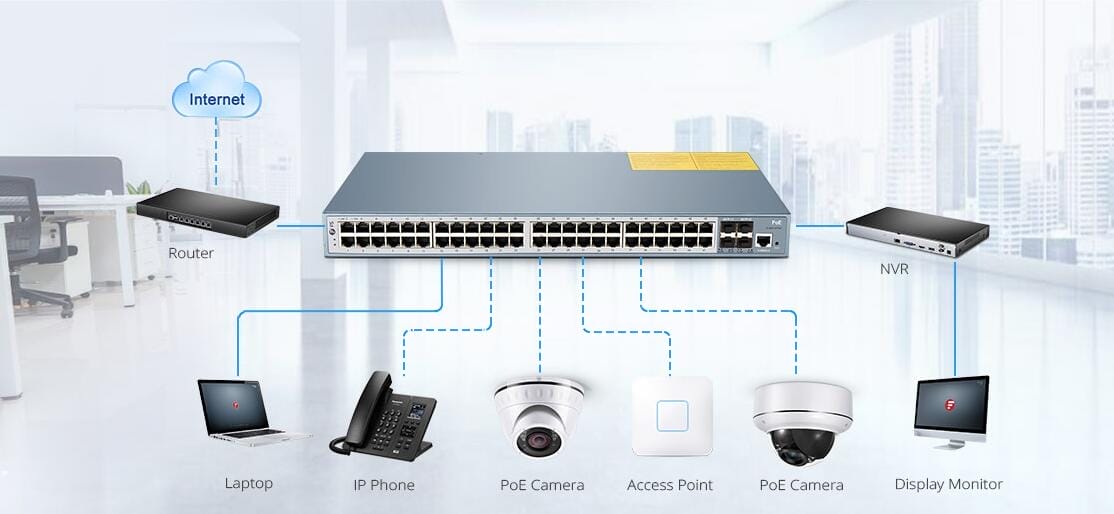
A PoE switch sends power and data down the same Ethernet cable, so a phone, camera or access point needs no power outlet. Before it powers a port, the switch checks that a PoE device is actually connected and asks how much power it needs. Plug in a laptop and the port stays plain Ethernet.
If you’re buying: check two numbers, not one. The PoE standard on each port has to match the device, and the switch’s total PoE budget has to cover every device at once. “PoE on all 24 ports” rarely means full power on all 24 at the same time.
PoE standards compared
| Power at the switch port | Power at the device | Typical devices | |
|---|---|---|---|
| PoE (802.3af, Type 1) | 15.4 W | 12.95 W | Desk phones, basic cameras |
| PoE+ (802.3at, Type 2) | 30 W | 25.5 W | Most Wi-Fi 6 access points, PTZ cameras |
| PoE++ (802.3bt, Type 3) | 60 W | 51 W | High-end access points, video phones |
| PoE++ (802.3bt, Type 4) | 90 W | About 71 W | Displays, heated outdoor cameras |
The gap between the two power columns is what the cable loses over 100 meters. Budget with the switch-port figure. Cisco sells its own versions under different names: UPOE is 60 W and UPOE+ is 90 W per port.
How a PoE switch powers a device
In PoE terms, the switch is the power sourcing equipment (PSE) and the phone or access point is the powered device (PD). Powering up takes three steps:
- Detection. The switch puts a small, safe voltage on the pair and looks for a PoE device’s signature resistance. No signature, no power. That’s why plugging a laptop into a PoE port is safe.
- Classification. The device tells the switch its power class, and the switch reserves that much from its budget.
- Power on. If the budget allows, the switch powers the port and keeps monitoring it, cutting power if the device is unplugged or draws too much.
Many devices then fine-tune their request over LLDP or CDP. One trap: an access point on a port that gives it less than it asks for will often boot, pass traffic and quietly switch off radios or USB. If a new AP underperforms, check its negotiated power before blaming the AP.
Powering access points, phones or cameras?
Since 2011 · 90-day warranty · Free US shipping · POs & net terms
How much PoE budget do you need?
Add up what each device reserves and compare it with the switch’s budget. The Catalyst C9200L-24P-4G-E has 24 PoE+ ports. With one power supply its PoE budget is 370 W; with a second supply installed it’s 740 W.
- Twelve access points at 30 W each: 360 W. That fits 370 W, with 10 W left, so the other twelve ports can carry data but not another AP.
- Eight access points at 30 W plus eight phones at 15.4 W: 363.2 W. That fits, just.
- Twenty-four access points at 30 W: 720 W. That needs the second power supply.
Devices rarely draw their full reservation all the time, but the switch budgets by reservation, so size for it. When you buy, check the PoE budget with the power supplies actually included, not the maximum the chassis supports.
How far does PoE reach?
The same 100 meters as any copper Ethernet run, patch cables included. PoE doesn’t extend the distance, and long runs of thin or cheap cable lose more power as heat. For a device beyond 100 meters, put a small PoE switch closer to it, fed by fiber.
When should you use a PoE injector?
An injector adds power to a single cable between a non-PoE switch and one device. It’s the right fix for one or two access points; for more than that, a PoE switch is cheaper and keeps everything in one place to manage.
Match the injector to the device: same PoE standard, enough watts, and a data port at least as fast as the AP’s. A Gigabit injector caps a 2.5G access point at 1 Gbps. HPE makes its own for Instant On, such as the Instant On PoE injector for the AP25. Avoid passive injectors on standards-based equipment: they skip detection and can damage devices that don’t expect them.
For where access points fit in a network, see access point vs router.
Get a quote
Send us your list of powered devices, or the PoE switch part numbers you’re comparing, and we’ll quote it the same business day.
Need a PoE switch for access points or cameras?
Since 2011 · 90-day warranty · Free US shipping · POs & net terms
