
Juniper Networks, Routers
Juniper Routers Explained: SRX, MX, ACX and PTX
Nov
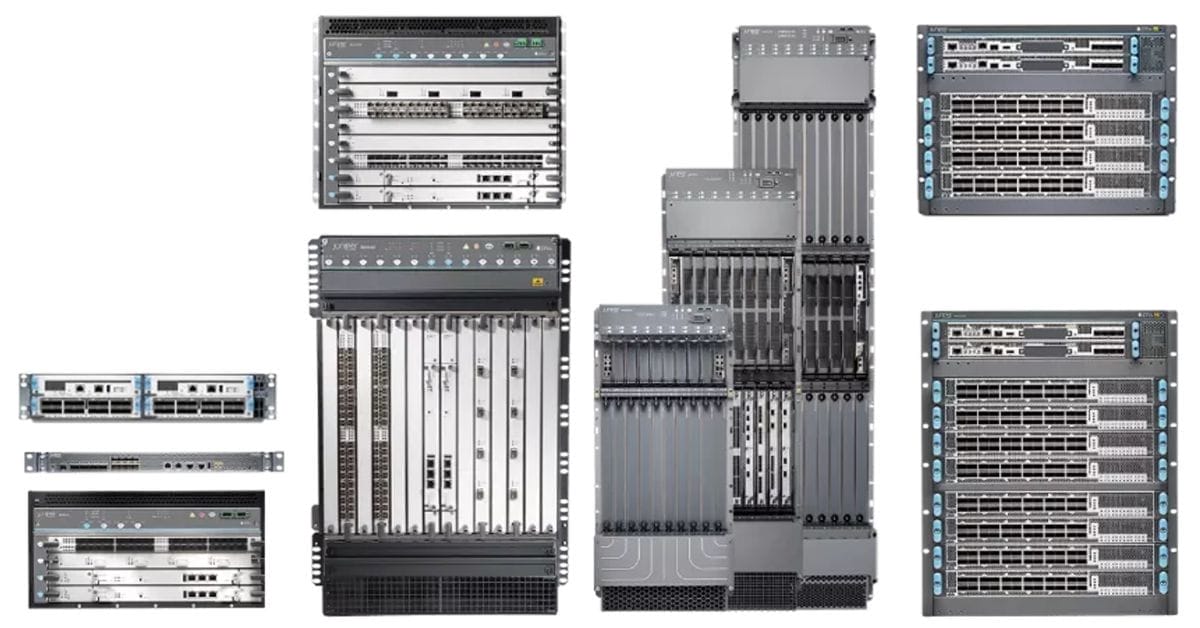
Juniper makes four families of routing hardware. SRX firewalls route and secure branch offices. MX routers handle the WAN edge, data centers and service-provider edge. ACX routers serve metro and access networks. PTX routers carry backbone and data-center core traffic. All of them run the same operating system, Junos.
For most enterprises the choice comes down to two: an SRX at each branch, and an MX at the internet edge or data center.
Juniper routers at a glance
| Built for | Example models | |
|---|---|---|
| SRX Series | Branch offices and campuses: routing, firewall and VPN in one box | SRX300, SRX320, SRX340, SRX345, SRX380 |
| MX Series | Enterprise WAN and internet edge, data centers, service-provider edge | MX204, MX304, MX480, MX960 |
| ACX Series | Metro, access and aggregation networks, mostly service providers | ACX7024, ACX7100, ACX5448 |
| PTX Series | Backbone, peering and data-center core | PTX10000 family |
| Session Smart Router | Software SD-WAN routing for branches, on Juniper or third-party hardware | Software |
SRX Series: routers for branch offices
In a Juniper branch, the SRX is the router. It connects to your internet links, routes between your VLANs, runs the firewall and builds VPN tunnels back to headquarters. Pick by site size:
- SRX300: small offices and retail sites.
- SRX320-POE: small offices that want to power phones and access points from the router.
- SRX340 and SRX345: mid-size and large branches, in a rack-mount chassis with more ports and throughput.
- SRX380: the largest branch model, with PoE+ ports and redundant power.
Part numbers ending in -SYS-JB include the Junos base software (routing, firewall, NAT and VPN); -SYS-JE adds Juniper’s enhanced security features. Our guide to upgrading Juniper firewalls covers when an older SRX is due for replacement.
Looking for a Juniper router?
Since 2011 · Manufacturer warranty on new units · Free US shipping · POs & net terms
MX Series: the enterprise edge and data center
MX routers are Juniper’s workhorses for the WAN edge. Large enterprises use them to connect to internet providers over BGP, terminate private WAN circuits and link data centers; service providers use the bigger chassis at the edge of their networks.
- MX204: 400 Gbps in one rack unit, with four 100G and eight 10G ports. The most common enterprise MX, and a favorite for internet edge and data-center interconnect.
- MX304: the MX204’s bigger sibling, a compact 2U router with 400G ports for higher-capacity edges.
- MX480 and MX960: modular chassis with line cards and redundant routing engines, for large data centers and service providers.
Older models like the MX5, MX80 and MX104 are still running in many networks. They’re past their prime for new deployments; the MX204 is the usual replacement.
ACX and PTX: service-provider routing
ACX routers are compact and built for metro and access networks: cell sites, business Ethernet handoffs and aggregation. The ACX7024 and ACX7100 are the current generation. PTX routers sit in the backbone, moving traffic between data centers and peering points at very high density. Enterprises rarely need either, unless they run their own metro or backbone network.
Session Smart Router
Session Smart Router is Juniper’s software SD-WAN router. Instead of building tunnels between every pair of sites, it routes each application session on its own path, and it runs on Juniper hardware or standard x86 servers. It’s managed from Juniper Mist alongside Juniper Wi-Fi and switches.
Which Juniper router do you need?
- A branch office: an SRX sized to the site. SRX300 or SRX320 for small offices, SRX340 to SRX380 for larger ones.
- An internet edge with BGP to two providers: an MX204, often in a pair.
- A large data center or provider edge: MX480 or MX960, or MX304 where space is tight.
- Replacing an MX5, MX80 or MX104: start with the MX204.
New and used Juniper routers
Link US is an authorized Juniper reseller. New Juniper equipment carries the full manufacturer warranty. We also source tested used Juniper equipment on request. Browse all Juniper products.
Get a quote
Send us the Juniper part numbers you need, or the site and links you’re planning for, and we’ll quote it the same business day.
Pricing Juniper routers or firewalls?
Since 2011 · Manufacturer warranty on new units · Free US shipping · POs & net terms
